


Volunteers play a critical role, and logging their hours cleanly and accurately is key for both internal tracking and grant reporting. StriveDB provides a dedicated interface for volunteers to log the time they spend on various tasks -- whether that is staffing the hotline or handling administrative work.
Accessing the Volunteer Time Log
Volunteers see a simplified version of the app. From their limited menu, they will see a clear option labeled "Log Time".
This opens their weekly timesheet.
Entering Time for Approved Task Categories
The log form includes rows for each task the volunteer is allowed to report time against. Examples might include:
- Hotline
- Administration
- Outreach
For each row, the volunteer will:
- Select a location (e.g., home, office)
- Enter hours worked for each day of the week
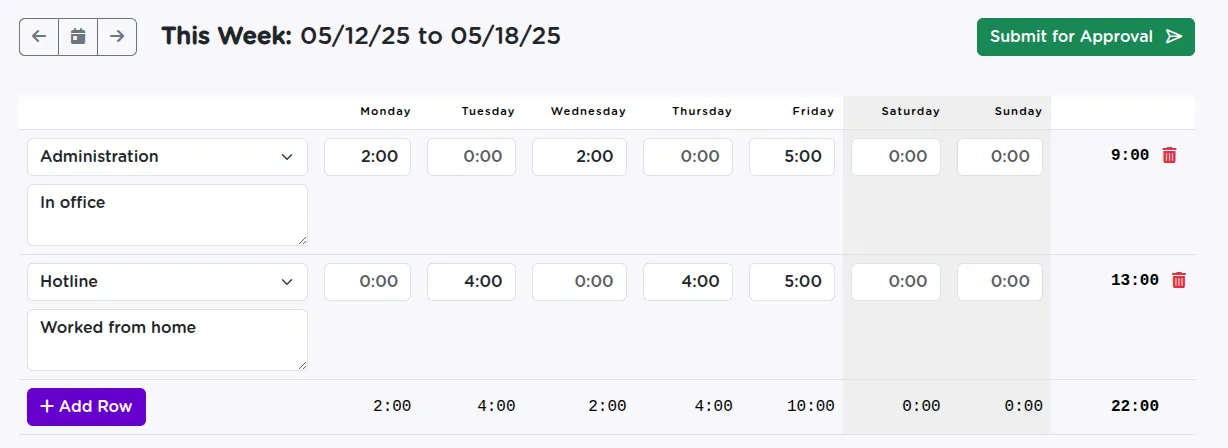
Volunteers only see the task codes their role is authorized to log against.
Submitting the Timesheet for Review
Once hours are entered, the volunteer clicks Submit. The timesheet moves into "submitted" status and becomes visible for review.
Once approved by a supervisor, the timesheet is marked as Ready.
Timesheets can be edited and resubmitted if something needs to be corrected later.
Volunteer Access and Permission Boundaries
Volunteers cannot access client data or see service logs. Time logging is restricted to their assigned task categories, and visibility into submitted time is scoped only to their own entries.
This makes it safe to use for both in-office and remote volunteers -- without exposing any survivor information.
Streamlined Time Tracking for Grant Compliance
Volunteer time logging in StriveDB is simple, secure, and built to meet the needs of nonprofit tracking and grant compliance. Whether volunteers are answering phones or assisting with outreach, their time counts -- and StriveDB makes it easy to capture.
Need help configuring volunteer roles or task codes? Reach out to support -- we will help you tailor it to your workflow.