


Sometimes a client's record needs to be seen by as few people as possible -- perhaps they are known to staff, involved in a sensitive case, or there is a conflict of interest. That is where Restrictions come in.
Restrictions allow you to lock down visibility on a client's profile, limiting access to a specific list of authorized users. Here is how it works.
When to Restrict a Client Record
By default, your staff may be able to see any client records they have permission for. But what if a counselor realizes a new intake is her neighbor? Or a staff member is personally connected to a survivor?
In these cases, restrictions let you:
- Prevent unwanted access to sensitive client records
- Limit visibility to a specific, approved list of users
- Document why that restriction is in place
How to Access the Restriction Settings
To restrict a client, start from their profile. Open the meatball menu (...) and look for the "Restrictions" option.
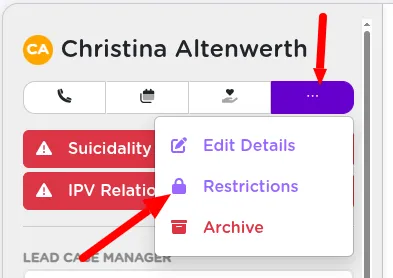
Enabling a Restriction on a Client Profile
Click the Enable Restriction button. You will be prompted to:
- Provide a reason for the restriction (e.g., "Known to center employee")
- Select who is allowed to access this client's data moving forward
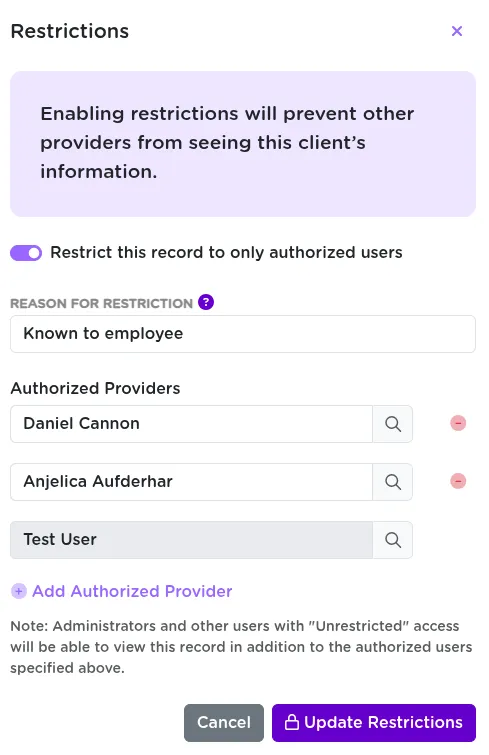
You will automatically be included on the access list when you set the restriction.
What Happens After a Restriction Is Applied
Once saved, a bold Restriction flag appears at the top of the client's profile. This includes the restriction reason and serves as a visual warning to other users.
Anyone not explicitly listed will no longer be able to view or search for this client in the system.
Managing Authorized Users on a Restricted Record
You can edit the restriction at any time to:
- Add or remove authorized users if circumstances change
- Remove the restriction entirely when it is no longer needed
This gives you tight control while still being flexible as needs change.
Related Training Guides
- Use the intake process to identify sensitive clients early.
- Combine restrictions with client flags to surface related concerns like suicidality or IPV.
Protecting Survivor Privacy with Record-Level Restrictions
Restrictions in StriveDB offer peace of mind when handling sensitive cases. They ensure only the right people have access and help you document why those limits are in place. This is a crucial tool for maintaining survivor privacy and staff boundaries.
Need help managing default permissions, visibility settings, or restriction review processes? Reach out to support -- we are happy to walk through it.